jotai-tanstack-query: Using Jotai with TanStack Query
TanStack Query owns the cache. Atoms just get to write the key.
The short answer
jotai-tanstack-query turns a TanStack Query query or mutation into a Jotai atom. TanStack Query still does all the server-state work: the cache, deduplication, retries, refetching and invalidation. Jotai only changes how you wire it up. The query can read other atoms to build its key, and other atoms can derive from the query's result.
Use it when the query's inputs already live in atoms (the selected user, a filter, the search text), or when several atoms need to compute something from server data. If one component calls useQuery and passes the result down, you don't need it. And if your client state lives in Zustand, there's nothing to integrate: put the store values in the query key and use plain useQuery.
| Setup | Pick it when | Watch out for |
|---|---|---|
useQuery + atoms read in the component | Most apps. A query is used in one or two places | You pass atom values into the key by hand |
jotai-tanstack-query | Query inputs are atoms, or atoms derive from the results | Both libraries must share one QueryClient |
useQuery + Zustand | Your client state is already in a Zustand store | Don't copy query data into the store |
| A plain Jotai async atom | A one-off fetch you never need to refresh | No cache, retries, refetch on focus or invalidation |
Two different jobs
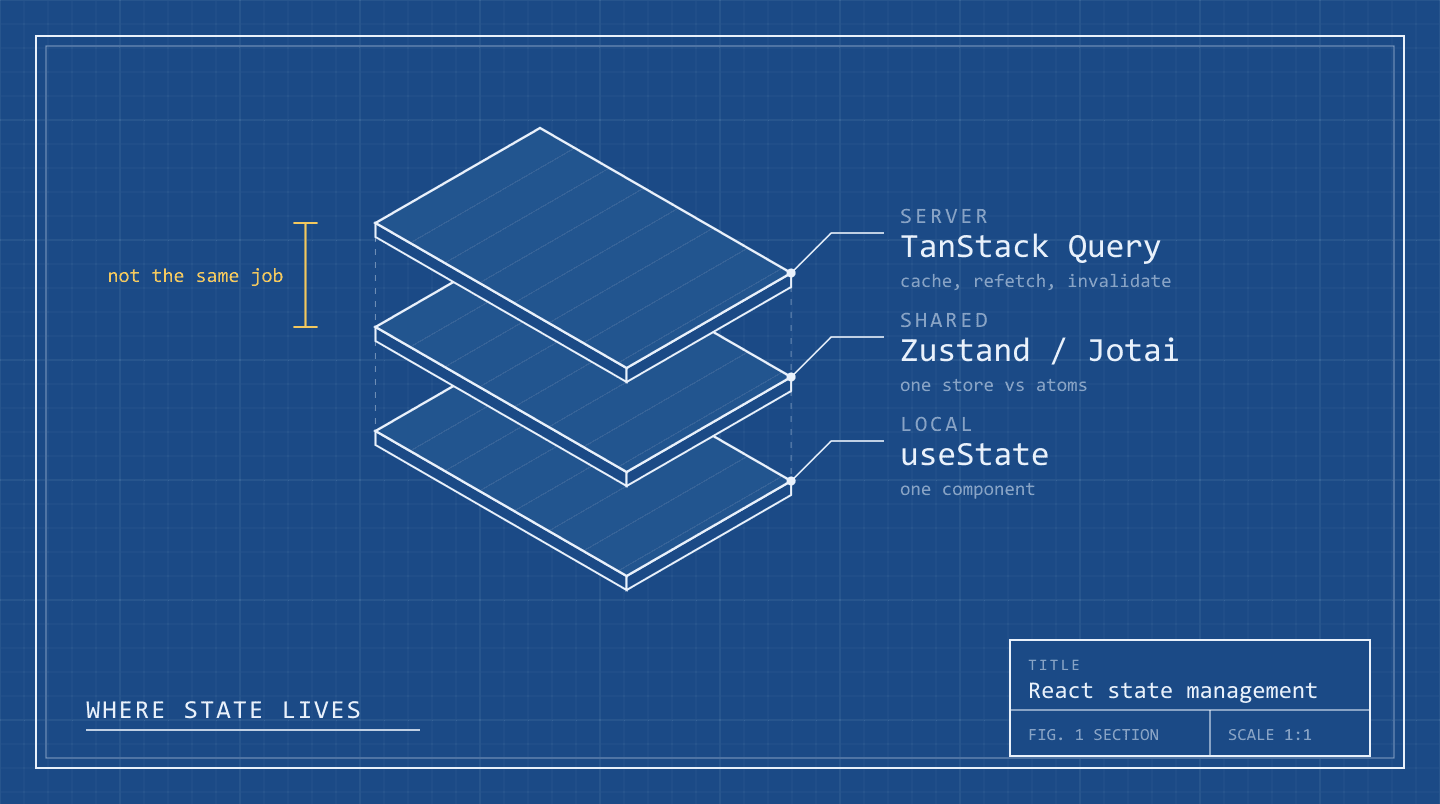
The split is the same one from the state management overview: server state and client state are different problems.
Server state is a copy of something you don't own. It goes stale, other users change it, and the request for it can fail. Caching it, refetching it and knowing when it's out of date is TanStack Query's whole job. If that framing is new, the interview answer on why React Query isn't a traditional state manager is a short read.
Client state is what your UI owns: which user is selected, whether done items are hidden, what's typed in the search box. Nobody else changes it. That's what Jotai's atoms are good at, especially when one value is computed from others.
Jotai can fetch on its own, too. An atom(async (get) => ...) suspends, re-runs when its dependencies change, and is a nice demo. But it isn't a cache. It holds the latest value and nothing else. There are no retries, no refetch when the tab regains focus, no stale time, and no way to say "everything under ['todos'] is out of date now". Rebuild those by hand and you've written a worse TanStack Query.
So the two don't overlap. The integration only matters at the seam: a query key that needs client state, and client state that needs server data.
What the atoms look like
Install all three packages:
npm i jotai jotai-tanstack-query @tanstack/react-queryA query atom takes a function that receives Jotai's get and returns ordinary TanStack Query options:
import { atom, type Getter } from 'jotai';
import { atomWithQuery } from 'jotai-tanstack-query';

type Todo = { id: number; title: string; done: boolean };

export const userIdAtom = atom(1);

export const todosAtom = atomWithQuery((get: Getter) => ({
  queryKey: ['todos', get(userIdAtom)],
  queryFn: async ({ queryKey: [, id] }): Promise<Todo[]> => {
    const res = await fetch(`/api/users/${id}/todos`);
    if (!res.ok) throw new Error(`HTTP ${res.status}`);
    return res.json();
  },
}));
The get: Getter annotation isn't decoration. Without it, id in the queryFn is typed unknown. That's the one entry in the package's own FAQ. Add as const to the key when you need id as a number rather than string | number.
Reading the atom gives you the same result object useQuery returns:
function TodoList() {
  const { data, isPending, isError, error } = useAtomValue(todosAtom);

  if (isPending) return <p>Loading…</p>;
  if (isError) return <p>{error.message}</p>;
  return <ul>{data.map((t) => <li key={t.id}>{t.title}</li>)}</ul>;
}
Every other export follows the same (getOptions, getQueryClient?) shape. In 0.11.0 the package exports atomWithQuery, atomWithSuspenseQuery, atomWithInfiniteQuery, atomWithSuspenseInfiniteQuery, atomWithQueries, atomWithMutation, atomWithMutationState and queryClientAtom. QueryClientAtomProvider comes from a separate entry point, jotai-tanstack-query/react.
The setup mistake: two QueryClients
Here's the bug that bites first. queryClientAtom has a default value, and in the 0.11.0 source it's a brand new client: atom(new QueryClient()). So if your app only renders TanStack's QueryClientProvider, your hooks use one cache and your atoms use another.
Nothing throws. You just get strange symptoms:
useQueryClient().invalidateQueries(...)refetches the hooks but not the atoms.- The Devtools don't show any of the atom queries.
- Data you prefetched on the server shows up as
pendingin atom-based components.
import { QueryClient } from '@tanstack/react-query';
import { QueryClientAtomProvider } from 'jotai-tanstack-query/react';

const queryClient = new QueryClient();

export function Root({ children }: { children: React.ReactNode }) {
  return <QueryClientAtomProvider client={queryClient}>{children}</QueryClientAtomProvider>;
}
If you already have your own Jotai Provider, do what it does inside: useHydrateAtoms([[queryClientAtom, queryClient]]) from jotai/utils, under both providers. The README shows the full version.
Once the client is shared, you can adopt the atoms one query at a time. useQuery and atomWithQuery with the same key read the same cache entry.
Atoms as query parameters
This is the main reason to use the integration. When the options function calls get(userIdAtom), the query atom depends on that atom. Set a new user id anywhere in the app, and the key becomes ['todos', 2]. A key that's already cached shows up instantly. A new one fetches. Nothing has to pass the id down through props, and there's no useEffect to keep in sync.
TanStack's rule for keys still applies: everything the queryFn depends on goes into the key. With atoms, that means reading them with get in the options function and putting them in the key. If the queryFn reads an atom the key doesn't include, the cache can't tell one user's data from another's. It keeps serving whatever it stored under that key.
Two details catch people when the key changes.
The old data disappears. While the new key loads, data is undefined and isPending is true, so your list flashes to a spinner. If you'd rather keep showing the previous list, pass placeholderData: keepPreviousData. It works in the atom the same way it works in useQuery, and isPlaceholderData tells you what you're looking at.
Some keys aren't ready yet. A dependent query waits for an input, and enabled reads atoms too:
const selectedProjectIdAtom = atom<number | null>(null);

const projectAtom = atomWithQuery((get: Getter) => {
  const id = get(selectedProjectIdAtom);
  return {
    queryKey: ['project', id],
    queryFn: () => fetchProject(id!),
    enabled: id !== null,
  };
});
Until a project is selected, the query sits in pending with fetchStatus: 'idle' and makes no request.
Deriving atoms from results
The other direction is where atoms feel natural. A derived atom can mix server data with client state, and only the components that read it re-render:
const hideDoneAtom = atom(false);

const visibleTodosAtom = atom((get) => {
  const todos = get(todosAtom).data ?? [];
  return get(hideDoneAtom) ? todos.filter((t) => !t.done) : todos;
});

const openCountAtom = atom((get) => (get(todosAtom).data ?? []).filter((t) => !t.done).length);
Toggling hideDoneAtom filters in memory and never touches the network. A refetch updates the query atom, and both derived atoms follow.
If a transformation doesn't depend on client state, use TanStack's select option instead. It belongs to the query, and it's one less atom.
What you shouldn't do is copy the result into a plain atom with set(todosListAtom, data). That's two sources of truth, the same mistake as syncing query data into Zustand. The copy goes stale on the next background refetch and nobody notices. A derived atom always reads the current cache.
Mutations and invalidation
atomWithMutation gives you the useMutation result plus mutate and mutateAsync in one atom. The usual pattern is to invalidate after success:
const toggleTodoAtom = atomWithMutation((get) => {
  const client = get(queryClientAtom);
  return {
    mutationFn: async (id: number) => {
      const res = await fetch(`/api/todos/${id}/toggle`, { method: 'POST' });
      if (!res.ok) throw new Error(`HTTP ${res.status}`);
    },
    onSuccess: () => client.invalidateQueries({ queryKey: ['todos'] }),
  };
});

// In a component
const { mutate, isPending } = useAtomValue(toggleTodoAtom);
Read the client with get while the options are built, and close over it. Reading atoms later from inside onSuccess does work, but it's easy to grab a value that changed while the request was in flight.
invalidateQueries matches by prefix, so ['todos'] marks every user's list as stale. The one on screen refetches right away. The others refetch the next time something reads them. If you need the variables or the server's response inside the update, they arrive in onSuccess(data, variables) like in any TanStack mutation.
Here's all of it together. The "server" is an object in memory with a 600 ms delay, so nothing touches the network. Watch the request counter: switching users fetches once per user and then serves the cache, hiding done items costs nothing, and toggling a todo invalidates both lists.
import { atom, useAtom, useAtomValue } from 'jotai';
import { QueryClient } from '@tanstack/react-query';
import { atomWithMutation, atomWithQuery, queryClientAtom } from 'jotai-tanstack-query';
import { QueryClientAtomProvider } from 'jotai-tanstack-query/react';
import { fetchTodos, requestCount, toggleTodo } from './api';
import './styles.css';

// Client state: Jotai owns it.
const userIdAtom = atom(1);
const hideDoneAtom = atom(false);

// Server state: TanStack Query owns it. The key reads an atom.
const todosAtom = atomWithQuery((get) => ({
  queryKey: ['todos', get(userIdAtom)],
  queryFn: ({ queryKey: [, id] }) => fetchTodos(id),
}));

// Derived from both. Changing hideDone never touches the network.
const visibleTodosAtom = atom((get) => {
  const todos = get(todosAtom).data ?? [];
  return get(hideDoneAtom) ? todos.filter((t) => !t.done) : todos;
});

const toggleAtom = atomWithMutation((get) => {
  const client = get(queryClientAtom);
  return {
    mutationFn: toggleTodo,
    onSuccess: () => client.invalidateQueries({ queryKey: ['todos'] }),
  };
});

const queryClient = new QueryClient({
  defaultOptions: { queries: { staleTime: 30_000 } },
});

function Todos() {
  const [userId, setUserId] = useAtom(userIdAtom);
  const [hideDone, setHideDone] = useAtom(hideDoneAtom);
  const { isPending, isFetching } = useAtomValue(todosAtom);
  const todos = useAtomValue(visibleTodosAtom);
  const { mutate, isPending: saving } = useAtomValue(toggleAtom);

  return (
    <main>
      <nav>
        {[1, 2].map((id) => (
          <button key={id} aria-pressed={userId === id} onClick={() => setUserId(id)}>
            User {id}
          </button>
        ))}
        <label>
          <input type="checkbox" checked={hideDone} onChange={(e) => setHideDone(e.target.checked)} />
          Hide done
        </label>
      </nav>

      {isPending ? (
        <p className="muted">Loading…</p>
      ) : (
        <ul>
          {todos.map((todo) => (
            <li key={todo.id}>
              <label>
                <input type="checkbox" checked={todo.done} disabled={saving} onChange={() => mutate(todo.id)} />
                {todo.title}
              </label>
            </li>
          ))}
        </ul>
      )}

      <footer>
        requests: {requestCount()} {isFetching && !isPending ? '· refetching…' : ''}
      </footer>
    </main>
  );
}

export default function App() {
  return (
    <QueryClientAtomProvider client={queryClient}>
      <Todos />
    </QueryClientAtomProvider>
  );
}
Notice that the checkbox you click doesn't stay checked right away. It waits for the mutation and the refetch, about 900 ms here. That gap is what optimistic updates close, and you'd write them in onMutate exactly as you would with useMutation.
Suspense
atomWithSuspenseQuery is the atom version of useSuspenseQuery. While the query has no data, reading the atom suspends, so data is always defined in your component:
const todosAtom = atomWithSuspenseQuery((get: Getter) => ({
  queryKey: ['todos', get(userIdAtom)] as const,
  queryFn: ({ queryKey: [, id] }) => fetchTodos(id),
}));

function TodoList() {
  const { data } = useAtomValue(todosAtom); // Todo[], never undefined
  return <ul>{data.map((t) => <li key={t.id}>{t.title}</li>)}</ul>;
}

// Above it: <ErrorBoundary> and <Suspense fallback={<Spinner />}>
Three things from the source that are worth knowing:
- It forces
enabled: true. A Suspense query can't wait for an input, so dependent queries belong inatomWithQuery. - Errors go to the nearest error boundary, but only when there's no cached data to show. A failed background refetch leaves the old data on screen.
- If neither the query nor the client sets a numeric
staleTime, it uses 1 second, so a value that just resolved isn't refetched immediately on mount.
Changing an atom in the key suspends again. The atom returns a pending promise for the new key, and the closest <Suspense> shows its fallback. If that's too jumpy for something like a filter, use the non-Suspense atom with keepPreviousData. For how Suspense data fetching works underneath, see the interview answer on Suspense.
SSR with the Next.js App Router
The README says all atoms work with SSR, using TanStack's usual hydration. That's true, but with the App Router there are three ways to get it subtly wrong.
1. One store and one client per request. Jotai's Next.js guide warns that the provider-less global store "is shared between multiple requests, which can lead to bugs and security risks". The same applies to the default queryClientAtom, which is created once per module. So on the server you need a fresh QueryClient per request, and in the browser one client for the session. TanStack's Advanced SSR guide has a getQueryClient() helper for exactly that:
// app/get-query-client.ts
import { environmentManager, QueryClient } from '@tanstack/react-query';

function makeQueryClient() {
  return new QueryClient({
    // Above 0, so the client doesn't refetch what the server just fetched.
    defaultOptions: { queries: { staleTime: 60 * 1000 } },
  });
}

let browserQueryClient: QueryClient | undefined;

export function getQueryClient() {
  if (environmentManager.isServer()) return makeQueryClient();
  return (browserQueryClient ??= makeQueryClient());
}// app/providers.tsx
'use client';
import { QueryClientAtomProvider } from 'jotai-tanstack-query/react';
import { getQueryClient } from './get-query-client';
export function Providers({ children }: { children: React.ReactNode }) {
return <QueryClientAtomProvider client={getQueryClient()}>{children}</QueryClientAtomProvider>;
}environmentManager arrived in TanStack Query 5.91. On older versions, use the isServer constant, which is now deprecated. The guide also explains why the client isn't kept in useState here: if a component suspends without a boundary between it and the provider, React throws that state away on the first render.
2. Prefetch in a Server Component. Fetch on the server, then pass the dehydrated cache to <HydrationBoundary>:
// app/users/[id]/page.tsx
import { dehydrate, HydrationBoundary } from '@tanstack/react-query';
import { getQueryClient } from '@/app/get-query-client';
import { fetchTodos } from '@/lib/api';
import { Todos } from './todos';

export default async function Page({ params }: { params: Promise<{ id: string }> }) {
  const userId = Number((await params).id);
  const queryClient = getQueryClient(); // on the server, a new client every time

  await queryClient
    .query({ queryKey: ['todos', userId], queryFn: () => fetchTodos(userId) })
    .catch(() => {}); // errors are handled on the client

  return (
    <HydrationBoundary state={dehydrate(queryClient)}>
      <Todos userId={userId} />
    </HydrationBoundary>
  );
}
queryClient.query() is new in 5.102. Before that, use prefetchQuery, which still works but is now marked deprecated.
3. Seed the atoms the key depends on. This is the one that's specific to Jotai. Atoms don't exist in Server Components, so on the first client render userIdAtom still holds its default, 1. The atom builds ['todos', 1], the server prefetched ['todos', 7], and the page renders a loading state for data that's sitting right there in the cache.
// app/users/[id]/todos.tsx
'use client';

import { useAtomValue } from 'jotai';
import { useHydrateAtoms } from 'jotai/utils';
import { todosAtom, userIdAtom } from '@/state/todos';

export function Todos({ userId }: { userId: number }) {
  useHydrateAtoms([[userIdAtom, userId]]);
  const { data } = useAtomValue(todosAtom);
  // ...
}
useHydrateAtoms hydrates each atom only once per store, which is what you want for initial state. It won't follow later prop changes, so after the first render, change the atom itself, not the prop.
When not to use it
The integration is thin, but it's still a dependency. Skip it when:
- The query lives in one component.
useQuerywith the atom value in the key is a few lines and needs no extra package. - Your client state isn't in Jotai. If filters live in Zustand or the URL, read them and pass them to
useQuery. There's no benefit in putting atoms in between. - The data is only needed for the first render. A Server Component can fetch it directly. A client cache only helps if the client refetches, mutates or shares that data.
- You need a guarantee for Jotai v3. As of today, the README still says it supports Jotai v2 and TanStack Query v5, and the latest release, 0.11.0, is from August 2025. Jotai 3.0.0 came out in September 2026. The integration's peer range (
jotai >=2.0.0) installs without warnings, and a quick test of queries, atom-based keys, mutations, Suspense and server rendering against Jotai 3.0.2 passed while writing this. That's a smoke test, not an official promise.
The package is small, too. Every query atom is built on one file, baseAtomWithQuery.ts, under 150 lines over TanStack's QueryObserver. Read it before you depend on it. You'll understand both libraries a little better.
FAQ
Is TanStack Query a state management library?
It manages server state: a cache of data you fetched, with rules for when it's stale. It doesn't replace a client state library, because it has nothing for values your UI owns, like a selected tab or an open panel.
Does jotai-tanstack-query work with TanStack Query v5?
Yes. Version 0.11.0 is built on TanStack Query v5 and its API follows v5's: isPending, placeholderData, throwOnError. Versions before 0.8 had a different, tuple-based API (atomsWithQuery), so ignore older tutorials that use it.
Can I use useQuery and atomWithQuery in the same app?
Yes, as long as both use the same QueryClient. Then they share one cache, and invalidating a key refreshes both. Use QueryClientAtomProvider, or set queryClientAtom yourself.
Should I pair TanStack Query with Jotai or with Zustand?
Pick by how your client state is shaped. Many small values that derive from each other and feed query keys suit Jotai. A few global values with actions suit a Zustand store. TanStack Query is the same either way.
So what should you pick?
- A query used in one place: plain
useQuery, with atom values in the key. - Query inputs are atoms, or atoms derive from server data:
jotai-tanstack-query, withQueryClientAtomProviderat the root. - You want Suspense:
atomWithSuspenseQuery, with an error boundary and a fallback above it. - Next.js App Router: a client per request, a Jotai
Provider, and seed the key atoms withuseHydrateAtoms. - Client state lives in Zustand:
useQuerywith Zustand selectors in the key. Skip the integration.
The cache belongs to TanStack Query either way. The integration just decides who gets to write the key.

Have a question, spotted a mistake or see it differently? I'd genuinely like to hear it.
Interview questions on this
All questions- What is Jotai and what is the atomic state model?State Management
- What is React Query and why is it not a traditional state manager?State Management
- What is Zustand and how does it differ from Redux?State Management
- What is the difference between local, global, server, and URL state?State Management
- What is optimistic UI and how do you implement it?State Management
Related posts
All posts- , 8 min readNext.js App Router vs Pages Router: A Practical Guide (2026)A practical comparison of Next.js App Router and Pages Router - routing, data fetching, layouts, caching, and when to actually use each one.
- , 12 min readReact Commit Phase: Sub-phases, Layout and Passive EffectsThe React commit phase runs before mutation, mutation and layout in one synchronous pass, then passive effects. Where each effect and its cleanup runs.
- , 12 min readReact State Management: Zustand vs Jotai vs TanStack QueryWhich React state tool for which state: TanStack Query for server data, Zustand or Jotai for shared client state, useState for local and the URL for filters.