React Rendering Explained
Mykola Nesterchuk - March 6, 2026
Introduction
Most React developers write components for months before asking: what actually happens when React renders something? The answer matters more than it seems. Understanding the rendering pipeline - virtual DOM, reconciliation, batching - helps you write faster code, debug unexpected behavior, and make sense of why performance tools say what they say.
This article breaks down the full picture.
What Is Rendering?
In React, rendering means one thing: calling your component function. That's it. React calls your function, gets back JSX, and figures out what to do with it.
Rendering does not mean updating the DOM. That's a separate step that may or may not happen after rendering.
function Counter({ count }) {
  console.log('rendered'); // this fires on every render
  return <p>{count}</p>;
}
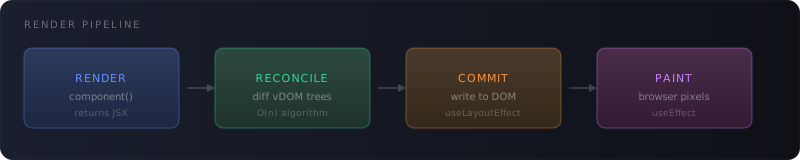
The lifecycle looks like this:
- Render phase - React calls your component, gets the JSX output
- Reconciliation - React compares new output to previous output
- Commit phase - React applies the minimal set of DOM changes
Virtual DOM
JSX compiles to React.createElement() calls, which return plain JavaScript objects - not real DOM nodes:
// what you write
<div className="card">
  <h2>{title}</h2>
</div>

// what it compiles to
React.createElement('div', { className: 'card' },
  React.createElement('h2', null, title)
);

// what you get back
{
  type: 'div',
  props: {
    className: 'card',
    children: {
      type: 'h2',
      props: { children: title }
    }
  }
}
This tree of objects is the virtual DOM - a lightweight in-memory description of what the UI should look like. Creating and comparing JS objects is orders of magnitude faster than touching the real DOM.
The virtual DOM isn't unique to React - it's a pattern. But React's implementation, especially with the Fiber architecture introduced in React 16, makes the comparison step interruptible and prioritizable.
Further reading: React Fiber Architecture by Andrew Clark - the original design document explaining why Fiber was built.
Reconciliation
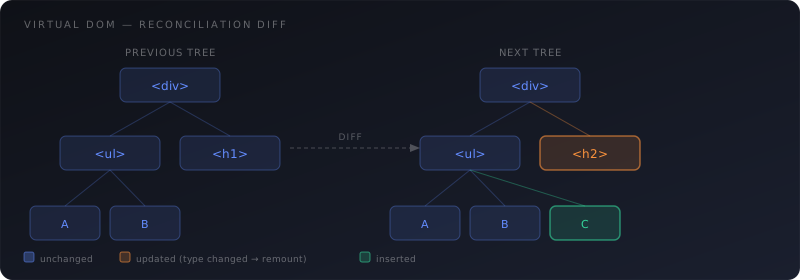
After every render, React has two virtual DOM trees: the previous one and the new one. Reconciliation is the process of diffing them to find the minimum number of real DOM operations needed.
Naively diffing two trees is O(n³). React reduces this to O(n) using two heuristics:
Heuristic 1: Different types produce different trees
If the element type changes, React tears down the old subtree entirely and builds a new one from scratch.
// React unmounts <Counter> and mounts <Profile> - no diff
{isLoggedIn ? <Profile /> : <Counter />}
This also means switching between component types at the same position resets all state in that subtree.
Heuristic 2: Keys identify stable elements in lists
Without keys, React diffs list items by position. Adding an item at the beginning shifts every subsequent item, causing unnecessary updates:
// ❌ React thinks every item changed
{items.map(item => <Item name={item.name} />)}

// ✅ React tracks by key - only the new item is mounted
{items.map(item => <Item key={item.id} name={item.name} />)}
Keys must be stable and unique among siblings. Avoid using array indices as keys when the list can reorder or filter.
Further reading: Preserving and Resetting State in the official React docs - explains exactly how position and keys affect component identity.
What Triggers a Re-render?
There are four causes:
1. setState / useState setter
Calling the state setter schedules a re-render of that component and all its descendants.
const [count, setCount] = useState(0);

// triggers a re-render
setCount(count + 1);

// also triggers a re-render - even if value is the same *object reference*
setCount(count); // won't re-render if count is a primitive with the same value
React uses Object.is to compare the old and new state. For primitives, equal values skip the re-render. For objects, it checks reference - {} !== {} even if contents match.
2. Parent re-renders
By default, when a parent re-renders, all children re-render too - regardless of whether their props changed:
function Parent() {
  const [count, setCount] = useState(0);

  return (
    <div>
      <button onClick={() => setCount(c => c + 1)}>+</button>
      <Child /> {/* re-renders every time Parent does */}
    </div>
  );
}
This is usually fine - rendering is cheap. Optimize with React.memo only when profiling shows a real cost.
3. Context changes
Every component subscribed to a context re-renders when the context value changes:
// all consumers re-render when `value` changes
<ThemeContext.Provider value={theme}>
  <App />
</ThemeContext.Provider>
Passing a new object reference on every render (e.g. value={{ theme, toggle }} inline) triggers all consumers on every render. Memoize the value:
const value = useMemo(() => ({ theme, toggle }), [theme, toggle]);
4. forceUpdate (class components)
In class components, this.forceUpdate() skips the shouldComponentUpdate check and forces a render. In function components there's no equivalent - and that's intentional.
Batching
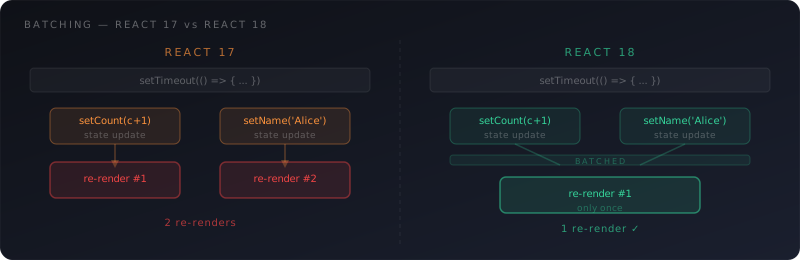
React doesn't re-render after every single state update. It batches multiple updates together into a single re-render.
function handleClick() {
  setCount(c => c + 1);
  setName('Alice');
  setVisible(true);
  // one re-render, not three
}
Before React 18, batching only happened inside React event handlers. Updates inside setTimeout, Promise.then, or native event listeners triggered separate re-renders.
React 18 introduced Automatic Batching - all updates are batched by default, regardless of where they originate.
If you ever need to opt out of batching (rare), use flushSync:
import { flushSync } from 'react-dom';

flushSync(() => setCount(c => c + 1)); // flushes immediately
flushSync(() => setName('Alice'));      // then this
Further reading: Automatic batching in React 18 - the original RFC explaining what changed and why.
The Commit Phase
After reconciliation, React enters the commit phase: it applies the diff to the real DOM. This is the only step that touches the browser.
The commit phase has three sub-steps:
- Before mutation -
getSnapshotBeforeUpdatefires here - Mutation - React inserts, updates, and removes DOM nodes
- Layout -
useLayoutEffectandcomponentDidMount/Updatefire here, synchronously
useEffect fires after the commit phase, once the browser has painted.
React 18 Concurrent Rendering
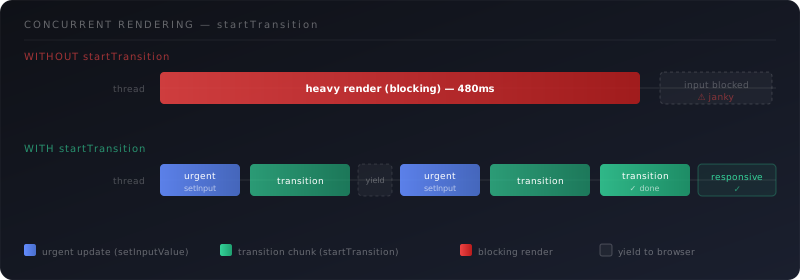
Before React 18, the render phase was synchronous and uninterruptible. A slow tree would block the browser from responding to input.
React 18's concurrent mode makes rendering interruptible. With startTransition, you can mark updates as non-urgent, letting React pause and resume them while keeping the UI responsive:
import { startTransition } from 'react';

// urgent - update input immediately
setInputValue(value);

// non-urgent - React can defer this if needed
startTransition(() => {
  setSearchResults(filter(data, value));
});
Further reading: Concurrency in React 18 - the official explanation of what concurrent rendering means in practice.
Summary
Here's the full picture in one place:
- Rendering = calling your component function, not updating the DOM
- Virtual DOM = a JS object tree describing the UI
- Reconciliation = diffing old vs new virtual DOM using type and key heuristics
- Re-render triggers = state change, parent render, context change
- Batching = multiple state updates → one re-render (automatic in React 18)
- Commit phase = the only step that touches the real DOM
- Concurrent rendering = interruptible render phase via
startTransition
Understanding this pipeline won't just help you fix bugs - it'll change how you structure components from the start.