postMessage Security: Checking event.origin the Right Way
A message handler without an origin check is an open API.
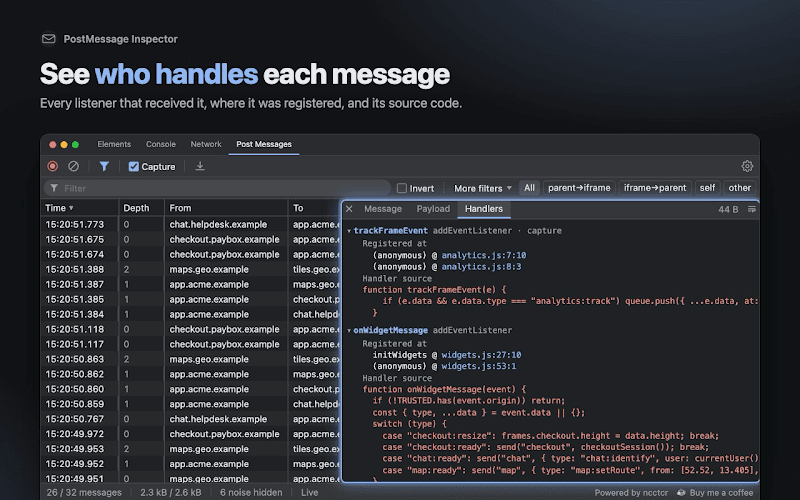
What I kept seeing in the Handlers tab
When I added the Handlers tab to PostMessage Inspector, the goal was purely practical: show which listener reacted to a message and where it was registered. It shows the listener's source too, mostly so you can recognise it.
Reading those sources every day changed how I look at message handlers. Many of them start like this:
window.addEventListener('message', (event) => {
  if (event.data.type === 'SET_TOKEN') {
    auth.setToken(event.data.token);
  }
});
There's no line about who sent the message. This handler will happily accept a token from any window that can reach it.
Why anyone can message you
postMessage exists precisely to cross origins. The browser delivers the message to any window the sender has a reference to — and getting a reference is easy:
- a page that embeds yours in an iframe gets
iframe.contentWindow; - a page that opens yours with
window.opengets the returned window; - your page gets
window.openerandwindow.parentback, and so does any frame inside it; - any frame can walk
window.top.framesto reach its siblings.
The browser doesn't decide whether a message is welcome. It stamps it with facts you can't fake — event.origin (the sender's origin) and event.source (the sender's window) — and leaves the decision to you. A handler that ignores them has made the decision already: everyone is welcome.
Checks that look right but aren't
The more interesting cases aren't the missing checks — those are easy to spot. They're the checks that are there and still let attackers in. Say we only trust https://trusted.com:
// ❌ substring: passes https://nottrusted.com and https://trusted.com.evil.io
if (event.origin.includes('trusted.com')) { … }
if (event.origin.indexOf('trusted.com') !== -1) { … }

// ❌ prefix: passes https://trusted.com.evil.io
if (event.origin.startsWith('https://trusted.com')) { … }

// ❌ suffix: passes https://eviltrusted.com
if (event.origin.endsWith('trusted.com')) { … }

// ❌ regex: unescaped dots and no anchors, passes https://trustedxcom.io
if (/https:\/\/trusted.com/.test(event.origin)) { … }
Every one of these attacker origins is a domain anyone can register for a few dollars. Subdomain checks are especially easy to get wrong, because "ends with trusted.com" and "is a subdomain of trusted.com" are not the same thing.
Try it: pick an origin or type your own and see which checks it gets past. Only https://trusted.com should pass; anything else that turns green is an attacker getting in.
import { useState } from 'react';
import './styles.css';

const TRUSTED = 'https://trusted.com';
const ALLOWED_ORIGINS = new Set([TRUSTED]);

const CHECKS = [
  { code: "origin.includes('trusted.com')", test: (o) => o.includes('trusted.com') },
  { code: "origin.startsWith('https://trusted.com')", test: (o) => o.startsWith('https://trusted.com') },
  { code: "origin.endsWith('trusted.com')", test: (o) => o.endsWith('trusted.com') },
  { code: '/https:\\/\\/trusted.com/.test(origin)', test: (o) => /https:\/\/trusted.com/.test(o) },
  { code: 'ALLOWED_ORIGINS.has(origin)', test: (o) => ALLOWED_ORIGINS.has(o) },
];

// Domains anyone can register for a few dollars.
const PRESETS = [
  'https://trusted.com',
  'https://nottrusted.com',
  'https://trusted.com.evil.io',
  'https://eviltrusted.com',
  'https://trustedxcom.io',
];

export default function App() {
  const [origin, setOrigin] = useState(PRESETS[2]);
  const legit = origin === TRUSTED;

  return (
    <main>
      <label>
        event.origin
        <input value={origin} onChange={(e) => setOrigin(e.target.value.trim())} spellCheck={false} />
      </label>
      <div className="presets">
        {PRESETS.map((p) => (
          <button key={p} className={p === origin ? 'active' : ''} onClick={() => setOrigin(p)}>
            {p.replace('https://', '')}
          </button>
        ))}
      </div>
      <table>
        <tbody>
          {CHECKS.map(({ code, test }) => {
            const passes = test(origin);
            const right = passes === legit;
            return (
              <tr key={code} className={right ? 'ok' : 'bad'}>
                <td><code>{code}</code></td>
                <td>{passes ? 'lets it in' : 'blocks it'}</td>
                <td>{right ? '✅' : '🚨'}</td>
              </tr>
            );
          })}
        </tbody>
      </table>
    </main>
  );
}
What a good handler looks like
An origin is just scheme, host and port — no path, no trailing slash. That makes the correct check boring, which is exactly what you want: exact comparison against an allowlist.
const ALLOWED_ORIGINS = new Set(['https://trusted.com', 'https://games.trusted.com']);

window.addEventListener('message', (event) => {
  // 1. Who sent it: exact origin match
  if (!ALLOWED_ORIGINS.has(event.origin)) return;

  // 2. Which window sent it: the one you expect
  if (event.source !== gameFrame.contentWindow) return;

  // 3. What it says: validate the shape before using it
  const msg = event.data;
  if (typeof msg !== 'object' || msg === null || typeof msg.type !== 'string') return;

  switch (msg.type) {
    case 'balance:changed':
      if (typeof msg.amount === 'number') updateBalance(msg.amount);
      break;
    // unknown types are ignored, not guessed at
  }
});
Each step catches something the previous one doesn't:
- The origin proves which site sent it.
- The source proves it came from the specific frame you think it did. Two frames from the same origin are different things: an old frame you forgot about, or a second widget from the same provider.
- Validation protects you from a trusted sender who sends something unexpected — a newer protocol version, a bug, or a compromised third-party script. Never pass message data to
innerHTML,eval,locationornew Functionwithout checking it.
If you really need "any subdomain", parse it instead of matching strings:
function isTrustedSubdomain(origin) {
  const { protocol, hostname } = new URL(origin);
  return protocol === 'https:' && (hostname === 'trusted.com' || hostname.endsWith('.trusted.com'));
}
Note the leading dot in '.trusted.com' — that's the whole difference from the broken suffix check above.
The same rule applies outside postMessage. A WebSocket handshake carries an Origin too, and your server has to check it the same way.
Don't trust "null"
Sandboxed iframes without allow-same-origin, data: URLs and some file: pages send messages with event.origin === "null" — the string. Every one of them looks the same, so putting "null" in an allowlist means trusting all of them at once. If you have to talk to a sandboxed frame, check event.source against that exact frame instead.
The other half: targetOrigin
Checking incoming messages protects you. The second argument of postMessage protects the data you send:
// ❌ whoever is in that frame right now gets the token
gameFrame.contentWindow.postMessage({ type: 'auth', token }, '*');

// ✅ delivered only if the frame is still on that origin
gameFrame.contentWindow.postMessage({ type: 'auth', token }, 'https://games.trusted.com');
Frames navigate. An ad slot, a redirect after an error, a provider that moved its game to another domain — and the window you hold a reference to now shows a different site. With '*', the browser delivers the message anyway. With a specific origin, it silently drops it. Use '*' only for data you'd be fine posting publicly.
Better still: one handshake, then a private channel
If two windows exchange many messages, you can check origins once and then talk through a MessageChannel. Messages on a port can only come from whoever holds the other end, so no other window can inject anything into that conversation:
// Host page
const GAME_ORIGIN = 'https://games.trusted.com';

gameFrame.addEventListener('load', () => {
  const { port1, port2 } = new MessageChannel();
  port1.onmessage = (e) => handleGameMessage(e.data);
  gameFrame.contentWindow.postMessage({ type: 'connect' }, GAME_ORIGIN, [port2]);
});// Inside the game frame
const HOST_ORIGIN = 'https://trusted.com';
let port = null;
window.addEventListener('message', (e) => {
if (port) return; // already connected
if (e.origin !== HOST_ORIGIN || e.source !== window.parent) return;
if (e.data?.type !== 'connect' || !e.ports[0]) return;
port = e.ports[0];
port.onmessage = (msg) => handleHostMessage(msg.data);
port.postMessage({ type: 'ready' });
});The handshake still needs the same origin and source checks — it's the one place where an attacker could try to hand you their port. After that, the channel is private. (Validating the data still applies.)
A checklist for every message handler
-
event.originis compared exactly against an allowlist — noincludes,startsWith,endsWithor unanchored regex. -
"null"is not in the allowlist. -
event.sourceis checked when you expect one specific frame. -
event.datais validated before use; unknown message types are ignored. - Message data never reaches
innerHTML,eval,new Functionorlocationunchecked. - Outgoing messages use a specific
targetOrigin, not'*'. - Long conversations move to a
MessageChannelafter a checked handshake.
Teaching the inspector to spot this
Right now PostMessage Inspector shows you each handler's source, and you do the reading. The next step on the roadmap is to do some of that reading for you:
- warn when a handler's source never mentions
originat all; - flag the weak patterns from this post —
indexOf,includes,startsWith, unanchored regexes on the origin; - a filter for "messages handled without an origin check";
- highlight payloads that look like secrets — tokens, passwords, JWTs.
It will be a heuristic, not a security audit: the extension sees source text, not what the code really does. But "this handler never checks origin" is exactly the kind of thing that's easy to miss in review and obvious once something points at it.
If you want to look at your own app's handlers today, PostMessage Inspector is on the Chrome Web Store and Firefox Add-ons — open the Handlers tab and read what your listeners actually check.

Frontend Developer · React, TypeScript, Next.js
Have a question, spotted a mistake or see it differently? I'd genuinely like to hear it.
interview questions on this
view allrelated posts
view all- When to Use WebSockets (and When You Don't Need Them)If the browser barely talks back, you probably want something simpler.Nov 9, 2026 · 13 min
- How I Built a DevTools Panel for Debugging postMessageDevTools shows every request and none of the messages. So I built the missing panel.Nov 7, 2026 · 11 min
- TypeScript Generics ExplainedA deep dive into generics - one of the most powerful and misunderstood features of TypeScript.Mar 4, 2026 · 4 min