When to Use WebSockets (and When You Don't Need Them)
If the browser barely talks back, you probably want something simpler.
The short answer
Use WebSockets when the browser and the server both need to send messages often, over the same connection, and a delay would be noticeable. Chat with typing indicators, multiplayer games, live cursors, collaborative editing.
If only the server has something to say, you probably want Server-Sent Events. If updates are rare, poll. If you're streaming one response, just stream that response.
That's most of this article, really. The rest is how to tell which case you're in, and what you sign up for once you open that socket.
| If you're building… | Use | Why |
|---|---|---|
| Chat with typing indicators and presence | WebSockets | Both sides talk all the time |
| Multiplayer state, live cursors, collaborative editing | WebSockets | The client sends many small updates per second |
| Notifications, activity feed, live score, build log | SSE | Only the server talks |
| An AI answer appearing token by token | SSE or a streamed fetch | One request, one long response |
| A dashboard that can be 30 seconds old | Polling | Nothing to maintain |
| A job status that changes a few times | Polling | A persistent connection would sit idle |
| Voice and video calls | WebRTC | Built for media |
"We need real-time" isn't a reason
This is the sentence that usually starts it. But "real-time" tells you how fresh the data has to be. A WebSocket is a two-way channel. Those are different things, and plenty of real-time features only need one direction.
So before you reach for one, ask yourself three questions:
- Who sends data after the page has loaded? If the user clicks a button now and then, that's a normal HTTP request. Even a chat message is fine as a
POST. WebSockets start paying off when the client sends a lot of small messages, like a cursor position several times a second. - How old can the data be? If 30 seconds is fine, you don't have a real-time problem. You have a
setInterval. - What happens if the connection dies for 20 seconds? It will, so you need an answer anyway. If the answer is complicated, that's work you should count now.
Here are the same three server events, delivered each way:
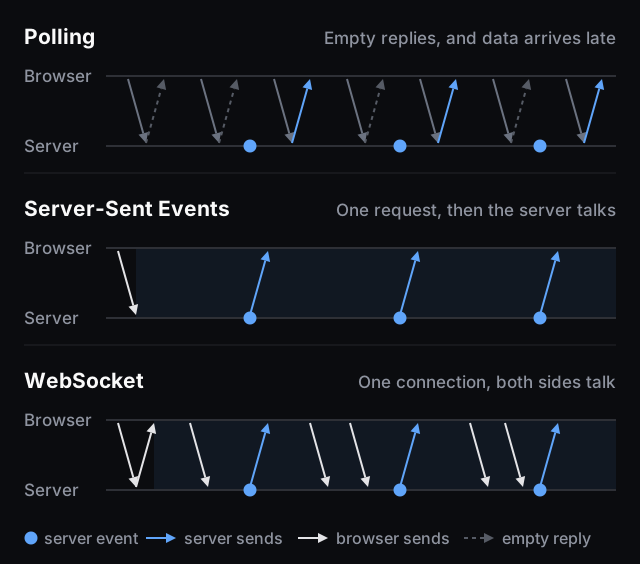
Here's what a WebSocket actually buys you. The connection starts as a normal HTTP request with an Upgrade header, the server answers 101, and from then on both sides send frames. A frame header can be as small as 2 bytes from the server and 6 from the browser, because client frames are masked. Compare that to sending all your headers and cookies with every HTTP request.
So the win is cheap messages in both directions on an already open connection. If you don't send many messages, or they only go one way, you're paying for something you won't use.
If you want the basic API first, I have a shorter interview-style answer with the client and server code.
An example: a live account balance
Say your app shows a balance in the header, and it has to stay correct.
It's a nice example, because the balance changes when the user isn't touching your UI. A payment gets confirmed, a scheduled job runs, someone else on the same account spends money. Polling for that from every logged-in user is wasteful, and a stale balance is the kind of bug people spot immediately.
So: WebSockets? Run it through the three questions. The traffic is almost entirely server to browser, and the user changes the balance through normal requests anyway. That makes SSE the first thing I'd try. WebSockets start making sense when the same connection also has to carry frequent messages from the client. If it's only a balance feed, you'd be paying for a direction you don't use.
Whichever you pick, remember that the connection is rarely the slow part. What you do with each message is. If every update triggers heavy calculations, move them to a Web Worker and keep the main thread free. With something like live charts, rendering will limit you long before the network does.
If messages come faster than the screen can show them and only the latest value matters, don't render each one:
let latest = null;
let scheduled = false;

socket.onmessage = (e) => {
  latest = JSON.parse(e.data);
  if (scheduled) return;

  scheduled = true;
  requestAnimationFrame(() => {
    scheduled = false;
    render(latest);
  });
};
This is for "latest value wins" data like a price or a balance. Don't do it to chat messages, you'll lose some. And if you render with React, it's worth knowing what a state update actually costs.
When SSE is enough
Server-Sent Events are just a long HTTP response that the server keeps writing to:
id: 1042
event: balance
data: {"amount":125.5}
And on the client:
const events = new EventSource('/api/events');

events.addEventListener('balance', (e) => {
  updateBalance(JSON.parse(e.data));
});
That's it, and you get things for free that you'd write by hand with WebSockets. The connection restarts by itself if it drops, and the browser sends the last event id back in a Last-Event-ID header, so the server knows where you stopped.
The limits you should know about:
- One way only. For the other direction, use normal requests. SSE down plus
POSTup covers a lot of "chat" features. - Text only, UTF-8. No binary.
- Use HTTP/2. Without it you get 6 connections per browser and domain, and that's across tabs. With HTTP/2 the stream limit is negotiated and defaults to 100.
EventSourceis minimal. Its constructor takes a URL andwithCredentials. If you need aPOSTbody or anAuthorizationheader, usefetchand read the stream yourself, and accept that you've lost the automatic reconnect.- Quiet connections can get dropped by old proxies. The HTML spec suggests sending a comment line every 15 seconds or so.
This is also how AI answers usually reach you. The Claude API streams over SSE, and Vercel's own guide tells you to pick SSE over WebSockets for AI token streaming. One request goes up, a stream comes down. There's nothing for a two-way channel to do.
When polling wins
Nobody writes conference talks about polling, but it's a perfectly good answer when updates are rare or a bit of staleness is fine. A report that's generating. An admin dashboard with five users. It works through every proxy, on every host, and when it fails you get a normal HTTP error in a normal log.
Just make sure you don't lose events between requests. Send a cursor ("everything after id 1042") instead of asking "what's new?".
What WebSockets will cost you
If you've gone through all that and you do need one: good, use it. Opening the socket takes one line. These are the parts that don't.
Reconnecting is your job
The browser's WebSocket gives you a close event, and that's where its help ends. Connections drop all the time: Wi-Fi changes, laptops sleep, and every deploy of your server disconnects everybody at once.
function connect(url, onEvent) {
  let attempts = 0;
  let lastSeq = 0;

  function open() {
    const ws = new WebSocket(url);

    ws.onopen = () => {
      attempts = 0;
      // This is a new connection. Tell the server where you stopped.
      ws.send(JSON.stringify({ type: 'resume', after: lastSeq }));
    };

    ws.onmessage = (e) => {
      const event = JSON.parse(e.data);
      if (event.seq <= lastSeq) return; // a replay can repeat events
      lastSeq = event.seq;
      onEvent(event);
    };

    ws.onclose = () => {
      const max = Math.min(30_000, 1000 * 2 ** attempts++);
      setTimeout(open, Math.random() * max);
    };
  }

  open();
}
Two things in there matter. The random delay is so that after a deploy your whole user base doesn't reconnect in the same second. And reconnecting the socket isn't the same as recovering what you missed: resume only works if the server numbers its events and keeps recent ones around. That's backend work you need to plan for.
Here's what that difference looks like. Nothing in this demo touches the network: a fake server numbers its events, and when you cut the connection, both clients come back after three seconds. Only one of them asks for what it missed.
import { useEffect, useReducer } from 'react';
import './styles.css';

const TICK_MS = 600;
const OUTAGE_MS = 3000;
const VISIBLE = 12;

const initial = { seq: 0, online: true, plain: [], resume: [] };

function reducer(state, action) {
  switch (action.type) {
    case 'event': {
      // The server numbers every event, whether anyone is listening or not.
      const seq = state.seq + 1;
      if (!state.online) return { ...state, seq };
      return {
        ...state,
        seq,
        plain: [...state.plain, seq],
        resume: [...state.resume, seq],
      };
    }
    case 'drop':
      return { ...state, online: false };
    case 'reconnect': {
      // The plain client just carries on.
      // The other one sends { type: 'resume', after: last } and gets a replay.
      const last = state.resume.at(-1) ?? 0;
      const missed = Array.from({ length: state.seq - last }, (_, i) => last + i + 1);
      return { ...state, online: true, resume: [...state.resume, ...missed] };
    }
    default:
      return state;
  }
}

function Client({ title, received, seq, online }) {
  const got = new Set(received);
  // While offline we can't call the newest events lost yet: they're just late.
  const settled = online ? seq : (received.at(-1) ?? 0);
  const lost = settled - received.length;
  const first = Math.max(1, seq - VISIBLE + 1);
  const ids = Array.from({ length: Math.min(seq, VISIBLE) }, (_, i) => first + i);

  return (
    <section>
      <header>
        <h2>{title}</h2>
        <span className={lost ? 'count bad' : 'count'}>lost: {lost}</span>
      </header>
      <ol>
        {ids.map((id) => (
          <li key={id} className={got.has(id) ? 'got' : id <= settled ? 'lost' : 'late'}>
            {id}
          </li>
        ))}
      </ol>
    </section>
  );
}

export default function App() {
  const [state, dispatch] = useReducer(reducer, initial);

  useEffect(() => {
    const timer = setInterval(() => dispatch({ type: 'event' }), TICK_MS);
    return () => clearInterval(timer);
  }, []);

  function cutConnection() {
    dispatch({ type: 'drop' });
    setTimeout(() => dispatch({ type: 'reconnect' }), OUTAGE_MS);
  }

  return (
    <main>
      <button onClick={cutConnection} disabled={!state.online}>
        {state.online ? 'Cut the connection' : 'Offline, reconnecting…'}
      </button>
      <Client title="Reconnects only" received={state.plain} seq={state.seq} online={state.online} />
      <Client title="Reconnects and resumes" received={state.resume} seq={state.seq} online={state.online} />
    </main>
  );
}
If you don't want to write this, Socket.IO gives you reconnection with back-off, packet buffering while offline, acknowledgements, rooms and a long-polling fallback. Just know that it's not a WebSocket implementation. It adds its own metadata, so a plain WebSocket client can't connect to a Socket.IO server, or the other way round.
Proxies close quiet connections
By default nginx closes a proxied connection if the backend sends nothing for 60 seconds. It also needs to be told to pass the upgrade through:
location /ws/ {
    proxy_pass http://backend;
    proxy_http_version 1.1; # not needed since nginx 1.29.7
    proxy_set_header Upgrade $http_upgrade;
    proxy_set_header Connection "upgrade";
    proxy_read_timeout 120s;
}
Raising the timeout only moves the problem, so also have the server send ping frames. And here's a detail that surprises people: the protocol has ping and pong, but they're not exposed to JavaScript. If the browser needs to notice a dead connection, you send your own heartbeat as a normal message.
One server is easy, two aren't
A connection lives inside one process. If user A is connected to server 1 and user B to server 2, a message from A has no way to reach B until you add something between them, usually Redis pub/sub.
Socket.IO calls this an adapter. The same page clears up something people often get wrong: it needs sticky sessions because of HTTP long-polling. Turn long-polling off and they're no longer required, but clients on restrictive networks may fail to connect.
Serverless changes the deal
For years the answer on Vercel was "you can't". That's out of date: Vercel Functions can serve WebSockets now, in public beta since June 2026. But every connection closes when the function hits its maximum duration, which is 300 seconds on Hobby and up to 800 on Pro (there's a 1,800-second beta). So reconnecting is a routine event there, and shared state has to live in an external store, because instances don't share memory.
Cloudflare has an interesting answer to idle connections: a Durable Object can hibernate while clients stay connected, and you don't pay duration charges while it sleeps.
Check the Origin yourself
This one is a security bug, so don't skip it. Browsers include cookies in the handshake, and a page on any site can try to open a socket to your server. If you authenticate by cookie and accept the connection, an attacker's page gets a live socket as your user. That's Cross-Site WebSocket Hijacking.
The protocol leaves this check to you: a server that doesn't validate Origin accepts connections from anywhere. Compare it against an exact allowlist. includes and startsWith fail here the same way they fail with postMessage.
For auth, the browser's WebSocket constructor only takes a URL and protocols, so there's no Authorization header. OWASP advises against tokens in the query string, because URLs end up in access logs. Its suggestion is to send the token in the first message and accept nothing else until it's validated. And being connected doesn't mean being allowed: check permissions for each action, and close the socket when the session expires.
Two smaller ones
Back/forward cache. Some browsers won't put a page with an open WebSocket into the bfcache. Chrome (as of 149) and Safari don't block on it, others do. The advice is the same either way: close on pagehide, reconnect on pageshow.
Backpressure. The WebSocket API has none. If the server sends faster than you can process, messages just pile up in memory.
What about WebTransport?
MDN recommends WebTransport if backpressure is your problem. It has multiple streams, datagrams and out-of-order delivery. It also only became Baseline in March 2026, so older browsers won't have it.
I wouldn't start there for a normal product feature yet. I'd keep it in mind for the cases WebSockets are bad at, like lots of independent streams or data where a late packet is useless.
FAQ
Are WebSockets faster than HTTP?
After the connection is open, sending a message is much cheaper, and there's no new request each time. But the first message is slower because of the handshake, and for a single request and response you gain nothing.
Should I use WebSockets or SSE for notifications?
SSE. Notifications go one way, and you get reconnection for free. Marking one as read is a normal request.
Do I need WebSockets for a chat app?
For typing indicators, presence and heavy traffic, yes, they're the natural fit. For a simple support chat, SSE for incoming messages plus POST for outgoing ones is less to maintain.
Do WebSockets work on Vercel?
Yes, in public beta since June 2026. Connections close when the function reaches its maximum duration, so your client has to reconnect regularly.
Do WebSockets work over HTTP/2?
Yes, but through a different mechanism. The Upgrade handshake only exists in HTTP/1.1, so RFC 8441 added an extended CONNECT for HTTP/2. Your client code stays the same.
So what should you pick?
- Updates are rare or can be a bit old: poll.
- Only the server talks: SSE, over HTTP/2.
- One long response, like an AI answer: SSE or a streamed
fetch. - Both sides send often and latency matters: WebSockets.
- Before shipping those WebSockets, make sure you have reconnect and resume, a heartbeat, an
Origincheck, and a plan for the second server.
Start with the simplest one that works. Moving from polling to SSE to WebSockets later is a lot easier than running a socket fleet you never needed.

Frontend Developer · React, TypeScript, Next.js
Have a question, spotted a mistake or see it differently? I'd genuinely like to hear it.
interview questions on this
view allrelated posts
view all- postMessage Security: Checking event.origin the Right WayA message handler without an origin check is an open API.Nov 7, 2026 · 8 min
- How I Built a DevTools Panel for Debugging postMessageDevTools shows every request and none of the messages. So I built the missing panel.Nov 7, 2026 · 11 min
- TypeScript Generics ExplainedA deep dive into generics - one of the most powerful and misunderstood features of TypeScript.Mar 4, 2026 · 4 min